

As a valued client of the Stratus Time system, we would like to make you aware of the newest Feature Enhancements and Releases. If you have ANY questions about how to maximize the newest functionality of your timekeeping system, please reach out to the Service Team.
New Functionality: Enhance employee timesheet submission notification for managers
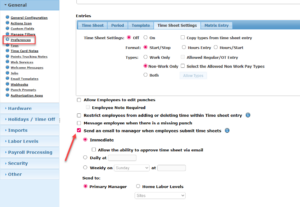
Options are available to set when a notification is sent to managers for when employees update (save/submit) their timecards. This functionality it beneficial to those who have employees submitting their time cards via Nettime for approval. To modify the notifications – select “Configuration (gear icon in upper right hand corner) > General > Preferences > Navigate to Entries Time Sheet settings”
Immediate – if the employee hits “submit” from their timecard, it sends an email. This will still send it every time the employee hits submit, so if they are entering day by day and hitting submit between each entry, it will produce that same number of emails to the manager.
Daily (at a specific time) – will send the email one time daily at the specified time and will capture the employees’ names who have submitted their timecard within the previous 24 hours. The employee names will only be listed one time no matter how many times the employee hits submit while filling out their timecards.
Weekly (on a specific day at a specific time) – will send the email one time on the day and time specified and will capture the employees’ names who have submitted their timecard within the previous week. The employee names will only be listed
Enhancement: Time Clock Enforcement Banners
When applicable, a new notification or banner will pop-up on hardware clocks when a required update is needed on the device. These updates should align with the timing of Nettime releases.