

PlanSource HCM’s Spring release is scheduled to be released between May 28th- May 30th! Included in this upgrade are several enhancements, updates, and new features designed to make the system more user-friendly and functional. Several of these items were implemented directly from client feedback and suggestions. Please see the below highlights for the Spring 2025 Release:
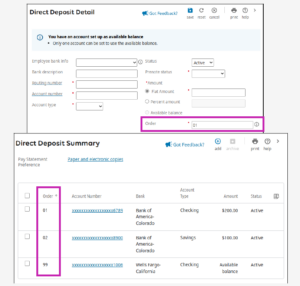
Employee Information – Assign Priority Order for Direct Deposit Accounts – Enabled On
When creating multiple direct deposit accounts, you can now manually assign a priority order to each account. This enhancement allows greater control over the order of finding to direct deposit accounts. The sequential order you enter, between 01 and 98, determines the priority in which your flat amount and percent amount accounts are funded until the pay is exhausted. Available balance accounts are automatically assigned an order of 99. The assigned sequence order displays in the new Order column in the Direct Deposit Summary grid.
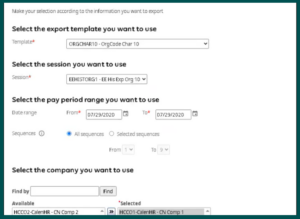
Employee Information – Create an Employee History Export File – Enablement Required
You can now create an Employee History Export report from your UKG Pro solution. This file includes information such as employee detail and history information, earnings, deductions, taxes, and accruals data. For example, you can use this file to export employee information to a fund administrator or a state new-hire reporting agency.
*Web Access Rights are required to access the Employee History Export functionality. Please reach out to the HCM Service Team to ensure we enable this feature for your applicable roles needing access.
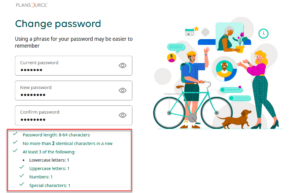
Security – Password Change Requirements – Enabled On
The UKG Pro Change Password page has been changed to allow you to change your password when at least 3 of the 4 password criteria have been met. The password requirements display on the Change Password page. When a password requirement is met, the text changes to green and a green check mark icon displays next to the password requirement.
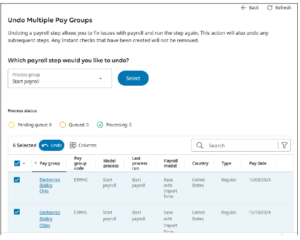
Payroll Gateway – Undo a Payroll Step for Multiple Pay Groups – Payroll Overview Access Required
You can now undo a payroll process step for multiple pay groups simultaneously. This feature allows you to make corrections to your payroll more quickly and efficiently across many pay groups at one time. From the Undo Multiple Pay Groups page. Access is required to the “Payroll Overview” page to utilize the Undo Multiple Pay Groups feature.
Please see the attached SOP that highlights how to utilize this feature.
Browser Compatibility
The following browsers and browser versions are supported:
Google Chrome – 109
Microsoft Edge – 109
Apple Safari – v16
Mozilla Firefox – 102
If your employees use the UKG Pro mobile app, they will need to use one of the following operating systems and versions:
Android – Version 7 (Nougat) or later
iOS – Version iOS13 or later
*Employees should not be using the UKG Pro Classic App, as this version is no longer being supported as of March 2025