

Mark your calendars! PlanSource HCM’s November release is scheduled to be released on November 5th, 2026. Included in this upgrade are bug fixes and new features designed to make the system more user-friendly and functional. Several of these items were implemented directly from client feedback and suggestions. Please see the following documentation highlighting all of the new features within UKG Pro, UKG Onboarding, and UKG Mobile App – as we include only some of the exciting features in this release below.
File Mapping Suggested by AI – Available in Classic/New Experience
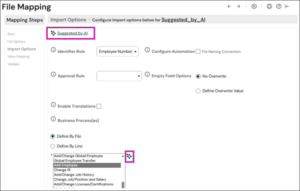
The Suggested by AI feature is now available when adding a new file mapping. This feature may suggest both a template selection and field mappings – making the building of an import template, easier for your administrators.
To start, the Suggested by AI sparkle icon and text display at the top of the Import Options page. The Suggested by AI sparkle icon also displays by any recommended template and field mapping suggestions, as applicable. You can review suggestions and make updates, as needed.
To access the Suggested by AI feature:
- From the File options page, after selecting a source file, File Type/Format, and entering a Mapping Description, select the Next arrow icon or the Import Options page from within the Mapping Steps menu.
- The Suggested by AI sparkle icon and text display at the top of the Import Options page. If there are any matching template suggestions, the sparkle icon also displays next to the template listing field with the suggested template selected.
- Select the Next arrow icon or the Value Mapping page from within the Mapping Steps menu.
- From the Value Mapping page, if there are any Target field mapping suggestions, the sparkle icon displays next to each suggested field with the suggested Target field selected. You can review suggestions and make updates, as needed.
Consolidate printed check files for instant checks – Available in Classic/New Experience
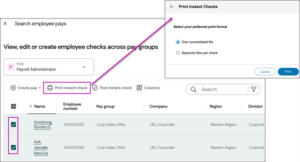
When you select multiple employees in the same pay group, then select Print instant check, a new Print Instant Checks dialog appears. From this dialog, you can choose to combine all checks for the pay group into a single pay file or to create all checks as separate files.
Note: All records must share the same bank.
When you select One consolidated file, all of the valid instant checks that are ready to print for all of the selected employees are printed onto a single PDF file.
Files are available on the File Transfers page: Menu > Administration > Reporting > Reporting > Under Standard reporting, select File transfers
Browser Compatibility
The following browsers and browser versions are supported:
Google Chrome – 109
Microsoft Edge – 109
Apple Safari – v16
Mozilla Firefox – 102
If your employees use the UKG Pro mobile app, they will need to use one of the following operating systems and versions:
Android:
Version 7 (Nougat) or later
Apple Devices:
iPhone – Version iOS13 or later
iPad: iPadOS 13 or later
*Employees should not be using the UKG Pro Classic App, as this version is no longer being supported as of March 2025