

As a valued client of the HCM Service Team – we strive to keep you informed on new features, and compliance updates that could impact your organization. UKG has adopted a new release schedule that will bring you new features, system enhancements and compliance updates monthly – not just during the Major Spring and Fall releases!
California Pay Data Reporting 2025 Compliance Update – Available now
The California Pay Data Reporting for 2025 introduces several compliance updates to ensure adherence to the latest state requirements. This update is required for private employers with 100 or more employees, including those hired through labor contractors, who must annually submit a pay data report to the California Rights Department (CRD). The report must detail employee pay, demographics, and other workforce data, including mean and median hourly wages broken down by race, ethnicity, and gender for each job category.
Please see the attached SOP to highlight the updates – new templates will be available in UKG
UKG Onboarding Updates – Available now
UPDATE 09/03 – UKG has delayed Onboarding layout enhancements until 09/18/2025.
This months Onboarding update brings new layout enhancements and changes to Gender Fields connected to EEOC.
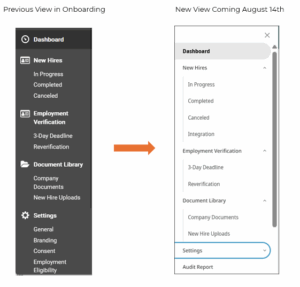
Please see the attached SOP to highlight the updates
UKG Pro Updates – Future Enhancement
UPDATE 08/18/2025: The multiple GL sessions functionality has been pushed back to a future release to ensure the new feature is refined to optimal performance. We will provide updates as we learn more about its new release date!
Updates to UKG this month are delivered from the requests of its users. The need to run multiple GL sessions and work in multiple tabs within a browser was highly requested – and now its here. Access is required to turn on multiple sessions, please let the HCM Service Team know if you would like to utilize this feature.
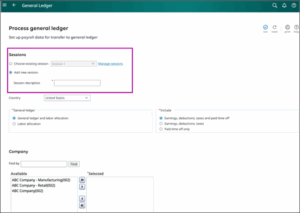
Please see the attached SOP to highlight the GL Updates
Coming August 22nd – Enhancing your Multi-Tab Sessions
To improve your experience when working across multiple tabs, UKG will be be implementing multi-tab session enhancements to your UKG Pro® solution.
Here’s a preview of what you can expect by Friday, August 22:
- Active sessions across all tabs: When you’re active in one or more tabs, your session will remain active across all UKG Pro and UKG Pro Workforce Management™ (WFM) solutions simultaneously.
- Session timeout notifications: If all tabs are inactive, you may receive a notification in each tab asking whether you’d like to stay active or end your session. If you choose to remain active, your session will be extended for all products. If you don’t respond or opt to end your session, you’ll be logged out.
With this update, multiple tabs can remain open for the following solutions:
- UKG Pro
- UKG Pro WFM
- UKG Pro Onboarding
- UKG Pro Recruiting
This enhancement is intended to allow you to remain active across multiple modules, if you are in Pro Core and also in Business intelligence working on a report, it will not inactivate your Pro Core session even if you have only been in Business Intelligence for the past hour.
New Standard Occupational Classification (SOC) Code Audit Standard Report
A new standard report is available to help you audit missing, invalid, or outdated standard occupational classification (SOC) codes assigned to employees in states that use SOC codes for state unemployment insurance (SUI) reporting.
The Standard Occupational Code (SOC) Audit employee management standard report lists employees who were hired before 2025, who are not terminated, and the reason why the assigned SOC code has an issue.
| Invalid Code Reason | Identified Issue |
| Blank | No assigned SOC code |
| Invalid | Assigned SOC code is not a valid code (for example, “00-0000”) |
| Multiple | Assigned 2010 SOC code has more than one replacement 2018 SOC codes |
| Without new value | Assigned 2010 SOC code does not have a direct replacement 2018 SOC code |
Configuration
For user roles that require the Standard Occupational Code (SOC) Audit standard report, please reach out to the HCM Service Team.